Executive Coach Website Builder with AI
Describe your practice. Get a coaching website that books discovery calls.
Built on CodeDesign4M+ websites
Loved by500K+ creators
Trustpilot & G24.7 out of 5

Your sample site follows the coach type and sections you pick above
What should a coaching website include?
A coaching website has to answer three questions quickly: who you help, how your coaching works and how to start. That usually takes the nine pages and sections below. CodeDesign drafts each one from your description, so you edit instead of facing a blank page.
A home page that names who you help
Lead with the people you coach and the change they want, then one clear button. Visitors should know within a few seconds whether you’re their coach.
The AI drafts itAn about page with your story
Your background, training and approach, and why you do this work. Mention credentials such as an ICF certification if you hold one.
The AI drafts itCoaching packages
Who each offer is for, what’s included, how long it runs and what it costs, or a starting price. Clear packages filter out enquiries that aren’t a good fit.
The AI drafts itClient stories
Specific testimonials, shared with permission: where the client started, the work you did together and what changed. Three specific stories beat ten vague ones.
The AI lays them outDiscovery call booking
A calendar where people pick a time for a free intro call, with the video link created for them. Every email between interest and booking loses people.
Built in: appointment schedulerA free guide or quiz
A checklist, short guide or quiz in exchange for an email address, for visitors who like what they read but aren’t ready to book.
Built in: Form BuilderAn intake form
The questions new clients answer before the first session, so you start with context instead of spending half the call on background.
Built in: Form BuilderA blog, podcast or resources page
Articles and episodes that answer the questions your clients search for. This is how people who have never heard of you find you on Google and in AI assistants.
Built in: BlogA privacy policy and cookie consent
If you collect emails or run tracking scripts, you need a privacy policy, and visitors from the EU and UK should be asked before non-essential cookies load.
Built in: cookie consent
Your website, bookings and leads in one place
CodeDesign is a coaching website builder with the rest of your practice built in. Most coaches stitch together a site, a scheduler, a form tool and a chatbot, each with its own login and bill. Here they live in one dashboard.
-
AI website builder
A first draft that sounds like you
Describe your practice in a sentence or two. The AI writes the pages, chooses images and lays out your packages and client stories. Then ask the AI Companion to make a section warmer or shorter, or click any text and change it yourself.
- Home, about, packages, stories and booking pages
- Rewrite any section by asking the AI
- Visual editor for text, images, colours and layout
- Write the site in your clients’ language
Career coach for teachers moving into tech. Warm, encouraging tone. AI CompanionDone. I built six pages: Home, About, Coaching, Stories, Free checklist and Book a call. Make the about page more personal AI CompanionRewrote it in the first person and opened with your ten years of teaching. HomeAboutCoachingStoriesChecklistBook a call -
Booking
Discovery calls go straight onto your calendar
Create a free 30 minute intro call, set the hours you take calls and put the booking calendar on your site. CodeDesign checks Google or Outlook Calendar for conflicts and adds a Zoom, Google Meet or Microsoft Teams link to every booking.
- One-to-one sessions or group calls with a set capacity
- Buffers, notice time and a daily limit
- Date overrides for holidays and travel
- Questions to answer before someone books
- An inline calendar, a floating button or your own button
 Maya BrooksCareer callBefore we talkWhat role are you hoping to move into?
Select a date and timeOctober 2026‹ ›
MTWTFSS1213141516171819202122232425
9:0010:30Next13:0016:30
Maya BrooksCareer callBefore we talkWhat role are you hoping to move into?
Select a date and timeOctober 2026‹ ›
MTWTFSS1213141516171819202122232425
9:0010:30Next13:0016:30
-
Forms
Intake forms and free guide sign-ups
Use Form Builder for lead forms, intake questionnaires and short surveys, then place them on any page. Collect emails for your free guide, or ask new clients the questions you’d otherwise spend the first session on.
- Lead capture for a guide, checklist or waitlist
- Intake questionnaires before the first session
- Short surveys and quizzes
Before our first sessionTakes about 3 minutes What would you like to change in the next three months?Move from teaching into a UX role without a pay cut. Have you worked with a coach before?YesNo Best time for sessionsWeekday eveningsWeekendsMornings Send answers New intake formJordan P. · 2 min ago -
AI chatbot
Answers questions while you’re in a session
Train the chatbot on your pages, FAQs and PDFs. It answers “How much is coaching?” or “Do you work with founders?” at any hour, captures the visitor’s details and hands the chat to you when a person should reply.
- Trained on your own content
- Captures leads into a live inbox
- Hand the chat over to you at any point
- Your name, colours and greeting
NNora’s assistantOnline · answers instantly How much does coaching cost? Nora’s 10 week program is $1,200, and you can pay in three parts. Most people start with a free 30 minute call.Coaching page Can I book a call this week? Leave your email and Nora will send timesalex@email.comSend -
Get found
SEO, a blog and analytics built in
Publish articles from the Blog app, draft them with the AI writing tools and run Website Analysis to catch missing titles, broken links and thin pages. Built-in analytics shows visitors, sources and top pages, and its script sets no cookies.
- A blog with SEO-ready posts
- A site audit that flags SEO issues
- Visitors, sources and top pages
- Your own domain, connected in a few steps
Last 28 days 2,418Visitors+18%7,906Views+12%3m 12sVisit duration Top pagesViews/blog/changing-careers-at-401,104/coaching612/book-a-call388
Websites for every kind of coach
Good website design for coaches starts with your field. Pick yours and the AI starts from the pages and wording that suit it. Each card fills in the prompt box above, ready for you to edit.

Life coach websites
Warm, personal pages with your story up front, a gentle first step and stories from past clients. Most life coaches lead with a free discovery call.

Business coach websites
Results first: revenue, hours saved, decisions made. Show who you work with, how your process runs and which program fits each stage. Still naming yours? Try the coaching business name generator.

Executive and leadership coaches
Credibility matters more than flair. Feature your leadership background, the kinds of leaders you work with and a discreet way to start a conversation.
Career coach websites
Speak to the moment: a job search, a promotion, a change of field. CV reviews, interview practice and longer programs work well as packages. Need a name? Try the career coaching name generator.

Health and wellness coaches
Calm design, program pages and an intake form for goals and habits. Keep claims about results honest and specific, and say what you don’t treat.

Fitness coach websites
Programs, client progress shared with permission, your training schedule and an easy way to book a first consultation, online or in person.

Relationship coach websites
Privacy and warmth. Explain how sessions work for individuals and couples, and offer a confidential first call that feels safe to book.

Mindset and confidence coaches
Lead with how clients feel after working with you. A free guide or short quiz is a gentle first step for people who aren’t ready to book.
Coaching website templates to start from
Prefer to start from a finished design? These are real CodeDesign templates for coaches, consultants and programs. Open one, then ask the AI to rewrite it for your practice.
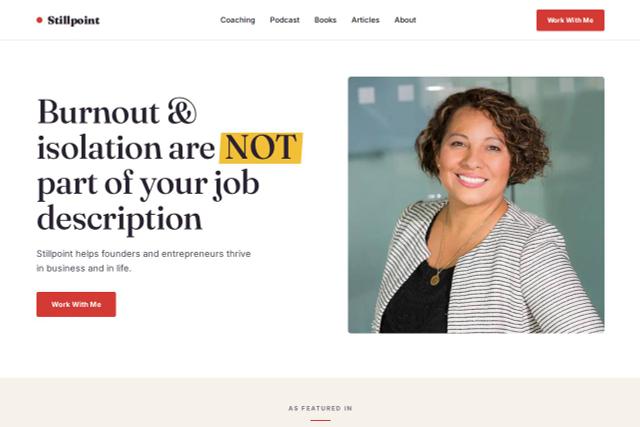
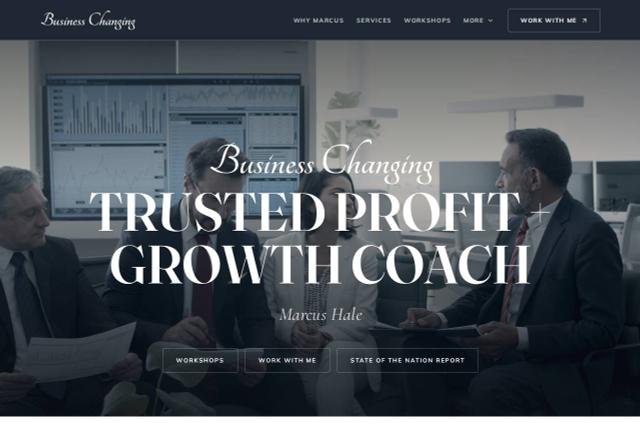
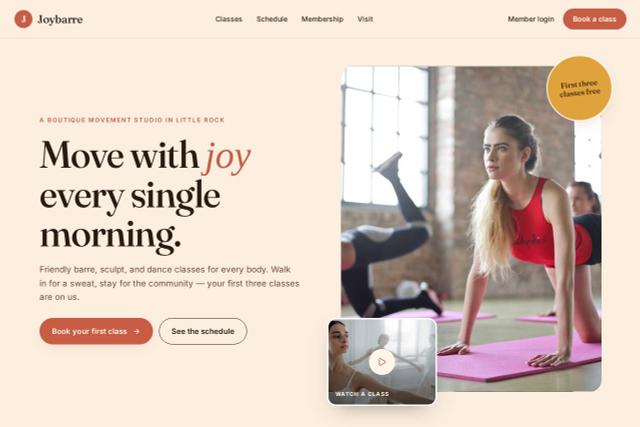
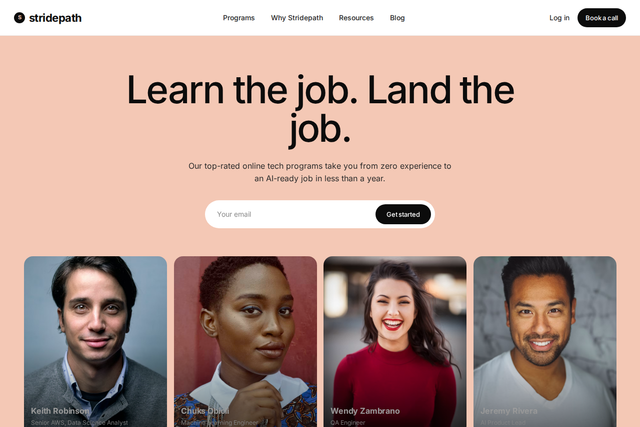
Best website builders for coaches in 2026
The five builders coaches ask us about most: what each costs, whether it builds a site from a prompt, whether booking comes with it and whether you can take your site with you.
| Builder | Free plan | Builds from a prompt | Booking built in | Code export |
|---|---|---|---|---|
| CodeDesign | Yescodedesign.app address | Yes | Yesappointment scheduler | YesHTML and React |
| Wix | Yeswith Wix branding | Yes | YesWix Bookings | No |
| Squarespace | No14-day trial | Yes | Add-onAcuity Scheduling | No |
| Showit | No14-day trial | No | Noembed another tool | No |
| Kajabi | Nofree trial | PartlyAI drafts sales pages | Yeswith coaching programs | No |
Features from each builder’s own website on 10 and 11 October 2026. Plans change often, so check before you choose. For general AI builders, see the best AI website builders compared.
CodeDesign
Best for: a site, booking and lead capture in one place
Builds a coaching site from a prompt, takes discovery call bookings and exports your code whenever you want to move.
Watch out: No built-in checkout or course hosting yet. Link package buttons to a Stripe or PayPal payment page.
Wix
Best for: coaches who want lots of add-ons
A big app market, Wix Bookings for sessions and plenty of templates.
Watch out: You can’t export your site’s code, so leaving means rebuilding.
Squarespace
Best for: polished design out of the box
Strong design defaults, with scheduling available through Acuity.
Watch out: No free plan, and scheduling is a separate subscription.
Showit
Best for: designers who want to place every element
Drag-anywhere design that’s popular with creatives and coaches who love visual control.
Watch out: You design each page by hand, and booking needs a separate tool.
Kajabi
Best for: selling courses, memberships and paid programs
Courses, coaching programs, payments and email in one platform.
Watch out: From $143 a month billed yearly, which is a lot if you mainly need a website.
How to create a coaching website in 6 steps
Whichever builder you choose, these steps get a coaching website live in an afternoon and keep it bringing in enquiries afterwards.
Generate my first draftSay who you help in one sentence
“I help first-time managers lead with confidence” works far better than “life coach”. That sentence becomes your headline, your page title and your prompt. No business name yet? Try the coaching business name generator.
Generate the first draft
Describe your practice to the AI website builder: who you help, what you offer and the tone you want. You get home, about, packages, stories and booking pages to edit, in about a minute.
Make your offer easy to choose
For each package, say who it’s for, what’s included, how long it runs and the price or a starting price. One main offer is easier to choose than five.
Add discovery call booking
Set your hours, a 20 or 30 minute intro call and a few questions to answer before booking. Put the button in your header and at the end of every page.
Add proof
Ask past clients for permission to share their story, use first names or initials if they prefer, and list your training and certifications.
Publish on your own domain and get found
Connect a domain with your name, write a clear title and description for each page, add a privacy policy, and publish one article a month that answers a question your clients ask.
Loved by 500K+ creators and small businesses
Showing our 5 star reviews from Trustpilot and G2.
-
A Great Website Builder for Non-Technical Business Owners
I recently created my first website using CodeDesign.ai, despite having no knowledge of coding, programming languages, or web development. The platform made the entire process remarkably simple and intuitive. As a business owner rather than an IT professional, I found CodeDesign.ai to be an excellent solution for creating a professional-looking website quickly and efficiently.
Henry Seeton Jun 9 2026, from Singapore -
Exactly what we needed to get online
We used CodeDesign.ai to build our website for our clinic, and honestly, it’s been a lifesaver! Their platform made it possible for us to create and launch our own site something we’d been trying to do for months. Before finding CodeDesign, we actually paid a lump sum to someone who promised to build our site and delivered nothing. So finally being able to do it ourselves feels amazing.
Jae Chris, USon Nov 3 2025, from United States -
Game Changer for Web Development!
I’ve been using CodeDesign.app for a recent project, and I have to say, it is hands down one of the most impressive AI website builders I’ve come across.
• Speed: Go from idea to live site in minutes.
• Code Export: The generated code is surprisingly clean and easy to work with if you need to host it elsewhere.
• Customisation: You aren’t locked into rigid templates; the editor gives you full control over colours, fonts, and layout.
SJ Parker, AUon Nov 11 2025, from Australia
More for your coaching business
- Appointment schedulerBooking pages for discovery calls, sessions and group calls.
- AI chatbotAnswer visitor questions and capture leads around the clock.
- Sales funnel builderFunnels for a free guide, a webinar or a program launch.
- Landing page generatorA one-page site for a workshop, retreat or cohort.
- DomainsFind and register a domain with your name.
- Website analyticsSee visitors, sources and your most-read pages.
- Coaching name generatorIdeas for your coaching business name in seconds.
- Website templatesStart from a finished design and make it yours with AI.
Coaching website questions
Can’t find an answer? Contact us or book a demo.
What is the best website builder for coaches?
It depends on what you sell. If you need a professional site with discovery call booking, intake forms and lead capture, an AI website builder such as CodeDesign gets you there fastest and lets you export your code later. If you mainly sell courses and memberships, a course platform such as Kajabi fits better, at a higher price.
How much does a coaching website cost?
You can build and preview a coaching website on CodeDesign for free, without a credit card. Plans with the AI builder start at $29 a month, and yearly plans come with a free domain. Course platforms such as Kajabi start at $143 a month billed yearly.
What pages should a coaching website have?
A home page that names who you help, an about page, coaching packages, client stories and a page to book a discovery call. Many coaches add a free guide sign-up, an intake form, a blog or podcast page, and a privacy policy.
What makes a good coaching website design?
Clear beats clever. Use one headline that names who you help, a real photo of you, an obvious button to book a call, readable text and client stories close to that button. Calm colours and plenty of white space suit most coaching niches.
Can clients book sessions on my coaching website?
Yes. The built-in appointment scheduler lets you create events such as a free 30 minute discovery call, set your availability, check Google or Outlook Calendar for conflicts and add Zoom, Google Meet or Microsoft Teams links. Show the calendar inline on a page, as a floating button or behind your own button.
Can I take payments for coaching packages?
CodeDesign doesn’t have a built-in checkout yet. Most coaches link each package button to a Stripe or PayPal payment page, or to the course platform they already use, and keep the first discovery call free.
Do I need design or coding skills?
No. The AI writes the first draft, and you change text, images, colours and layout in the visual editor or by asking the AI Companion. If you do code, you can export the site as HTML or React.
Will my coaching website show up on Google?
CodeDesign builds pages with titles, descriptions and a clean structure, and Website Analysis flags issues such as missing titles or broken links. Ranking still takes useful content, so publish articles that answer the questions your clients ask.
Can I use my own domain?
Yes. Register a new domain in CodeDesign or connect one you already own.
Can I move my coaching website later?
Yes. Export the code and host it anywhere, or publish through WordPress. Your site isn’t locked in.
Can the AI write my website in another language?
Yes. Choose the language in the prompt box before you generate, and the AI writes your pages in it.
Your coaching website, drafted in about a minute.
Describe who you coach and how you help. You can change every word before anyone sees it.
Or start from a coaching template.